🖥️
Fully Self-Hosted
Runs entirely on your local machine — no cloud, no subscription, no external server.
Control OBS, Spotify, Twitch, and your PC from any phone, tablet, or laptop on your Wi-Fi network — no specialized hardware, no cloud, no subscription.
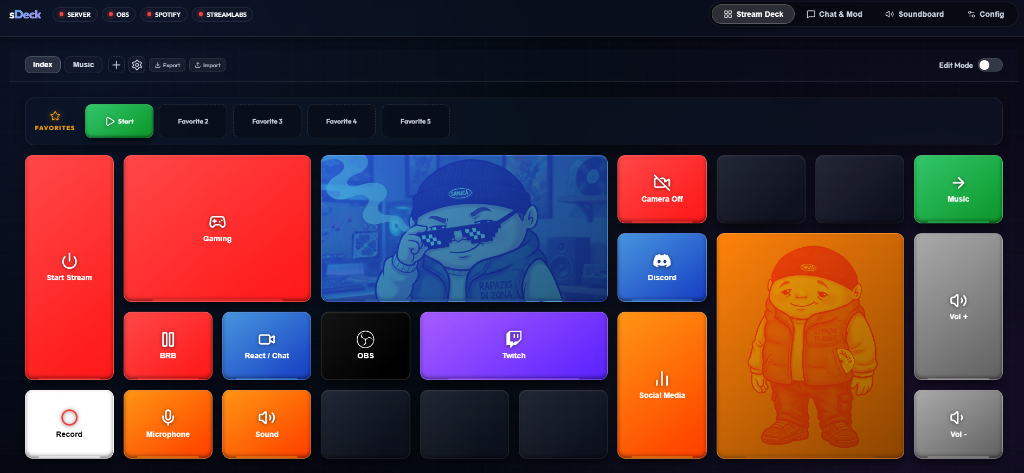
sDeck is a free and open-source alternative to a hardware Stream Deck. Instead of buying dedicated buttons, you host sDeck on your streaming PC and control it from any device already on your Wi-Fi network — a phone propped up next to your keyboard, an old tablet, or a second monitor. It talks directly to OBS Studio, Spotify, Twitch, and Streamlabs, and can also run shell commands, PowerShell scripts, and webhooks on the host machine.
git clone https://github.com/itsiurisilva/sDeck.git
cd sDeck
Then launch it — double-click INICIAR.bat on Windows, or run chmod +x start.sh && ./start.sh on macOS/Linux — and open http://localhost:3000. The launcher installs dependencies and generates config templates on first run.
See the Getting Started guide for pairing devices, and Integrations for connecting OBS, Spotify, Twitch, and Streamlabs.